The Omnesis Chrome extension started with a fairly simple job: capture the pages I spend time on so that they can also get indexed in Omnesis. This post talks about how and why I came to build that extension, why it contributes meaningful information into my corpus, and how I then extended it to also enable quickly finding URLs I’ve encountered in the past.
Capturing and indexing the web pages I’ve seen
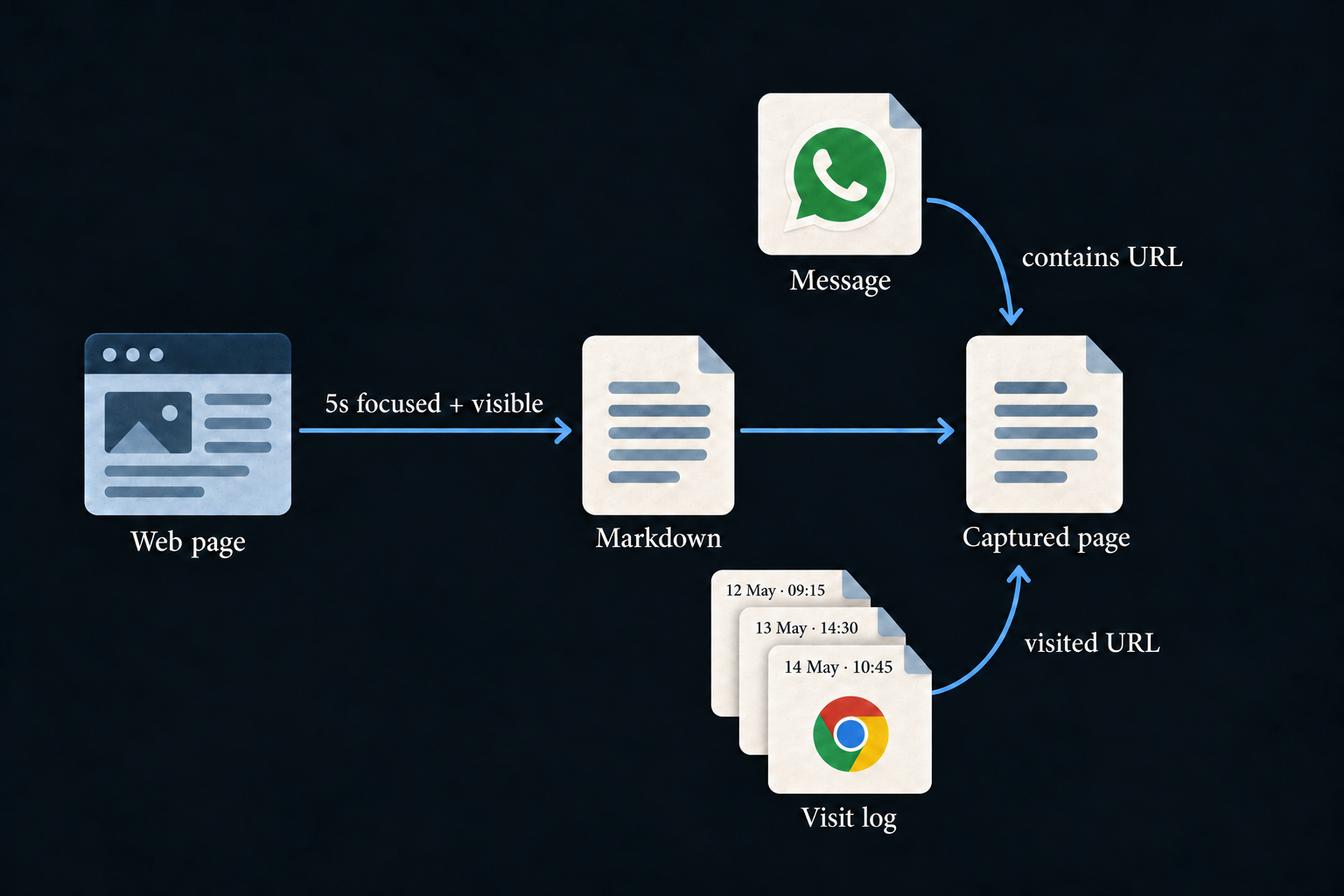
The extension does not capture every URL that flashes through a tab. A page first needs to accumulate five seconds of focused "dwell" time. If I switch to another tab or window, the clock pauses; it resumes when I come back.
Once a page qualifies, the extension extracts meaningful content from its rendered DOM: the page as the browser sees it, including content loaded by JavaScript. It uses Defuddle to identify the main content, then Turndown to turn that content into Markdown. Headings, lists, links, tables and code blocks keep their structure, while scripts and much of the surrounding noise are left behind. If the main-content extraction produces too little, there is a fallback to cleaned-up body content.
That work happens in the browser. The extension sends the title, URL and extracted Markdown to my paired Omnesis gateway, rather than sending the raw HTML. A content hash avoids pushing the same text repeatedly, while a separate visit record keeps track of qualifying visits. For pages that change after capture, a debounced re-extraction can update the stored content.
Capturing browsing content also needed privacy controls. Private browsing is excluded. The default rules skip pages with password fields and common sign-in or payment paths, and extraction removes form controls and editable fields. I also added knobs to allow excluding a domain, including its subdomains, or pause capture. Those settings live on the gateway and apply across paired browsers. Domains already covered by a dedicated source are skipped, and deleting a captured page “for good” prevents it from being captured again.
A page becomes part of the graph
A captured page is a document in Omnesis, so its content can be indexed and searched like content from other sources. Its URL also gives us a way to connect it to documents that mention the same destination.
Imagine my wife sends me a link to a show she’d love to see on WhatsApp. Omnesis can index the message containing that URL. If I later open the show’s page and spend enough time on it, the extension contributes the page content and a visit record. The shared URL connects the message and the captured page, while the visit records when I spent time there. In a later conversation with Omnesis about gift ideas for my wife, the agent could follow that trail and suggest the show as a possible idea.
Another benefit is indexing my private conversations with ChatGPT, for example. ChatGPT does not provide an API for synchronizing personal conversation history, so Omnesis cannot index those conversations through an API the way it does with Gmail or Google Drive. Browser capture is a way around that limitation: the Chrome extension captures and indexes the conversations I open and spend enough time on. It does not synchronize my entire conversation history.
Evolving the Chrome extension to also help me find URLs I care about
Up to this point, the extension was mostly producing data for the Omnesis index. I started asking myself what else it could do for the user using their corpus.
Search felt like the obvious place to start. I often found myself opening the Omnesis app or web portal and querying the agent just to find a URL I wanted to open on my desktop. So I decided to have the Chrome extension help me with that workflow.
Chrome exposes an omnibox API, which lets an extension offer its own
search keyword and suggestions in the address bar. For Omnesis, the keyword is
om: I type it, press Tab or Space, and enter my query.
There are two APIs involved here. Chrome’s omnibox API provides the address-bar interaction. The Omnesis gateway provides the retrieval: its search pipeline combines full-text matching and vector similarity, and the browser Find endpoints turn that into suggestions or a complete search workflow. This searches the sources I have indexed, rather than limiting me to captured web pages.
Standard search, with suggestions as I type
Sometimes I know roughly what I want and just need a matching document. An invented example would be finding an email containing a home-insurance quote. I might remember the words “insurance quote” but not the sender or exact subject line. Another example could be "Granola meeting notes of my meeting with Luke about the home purchase".
In standard search mode, Omnesis uses its existing index to return ranked matches. Full-text search helps when I remember specific words; vector search helps when my description differs from the wording in the document. I can open a result in its original source when it has a browser-openable link.
While I type in the address bar, the extension offers up to six suggestions. If the right destination appears, I can select it straight away. Otherwise, submitting the query opens the extension’s Find surface for the full search.
Making those type-ahead suggestions practical meant making search faster. A query that takes seconds might be tolerable when I explicitly submit it, but suggestions need to keep up as I type. That was what prompted the recent search work I describe in How search works in Omnesis, and how I made it faster.
Agentic search, when matching a document is not enough
The index retrieval I’ve described above doesn’t require an agent turn: the query goes directly through the search engine, with results typically arriving in a few hundred milliseconds on my setup. The decision gate for a submitted query is a separate step. However, sometimes I may make requests that require a full agent turn. For example the following query: "Find the link my friend Miguel sent me on WhatsApp about bicycle tyre repair". A standard search might find the relevant conversation. But the conversation is not necessarily the destination I asked for. The useful result is the link inside the message.
An agent can search for the conversation, inspect the relevant message, and extract the supported destination. If the page has also been captured, its content gives the agent more evidence about what the link points to. A captured copy is useful context, but it is not required to return a URL already present in a message.
This is why I wanted two distinct modes. For a submitted query, a decision gate (TypeSafe’s JEV) judges whether ordinary document matching is sufficient or whether the request needs evidence inspection, relationships or a calculation.
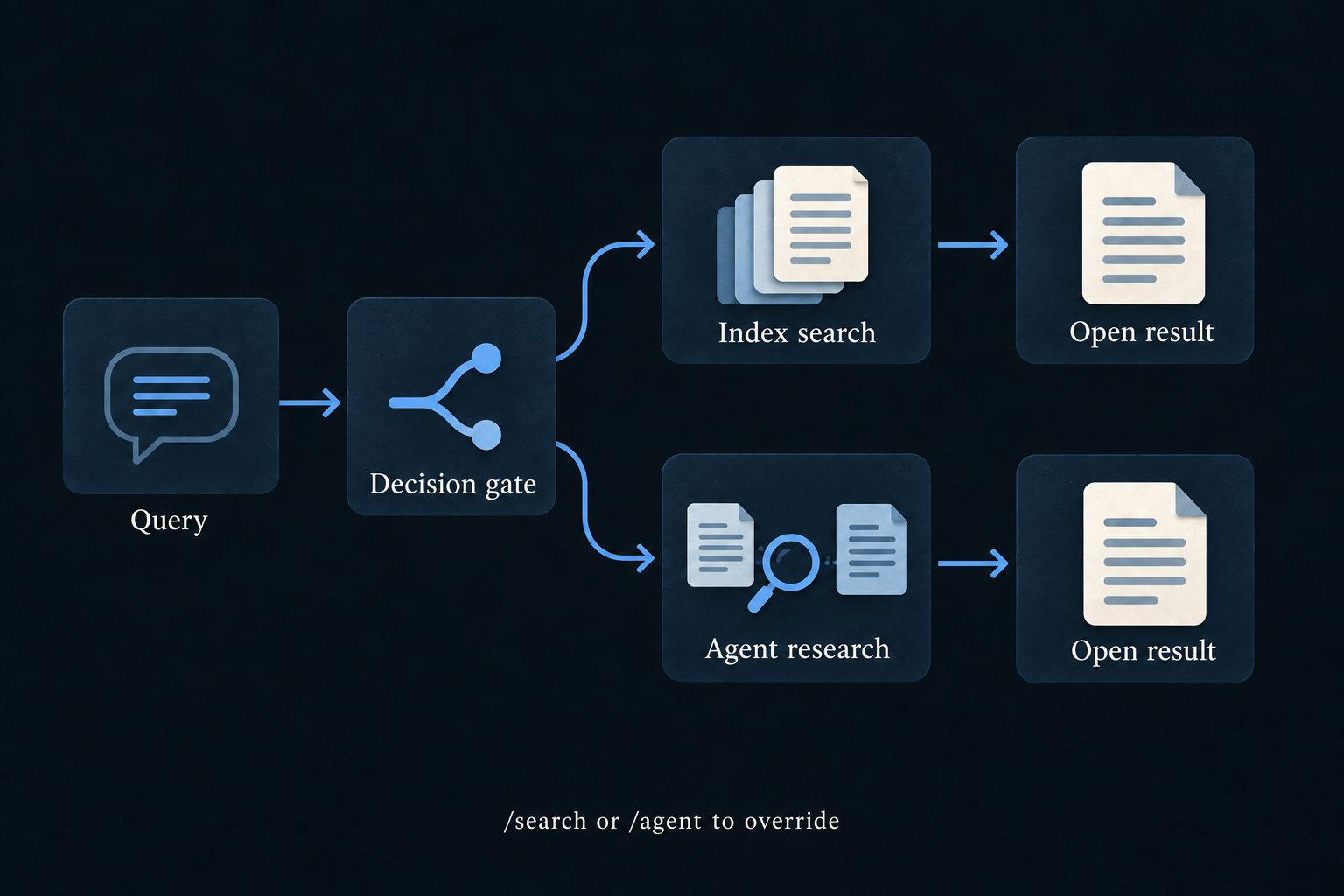
I also wanted to keep control over that choice. Prefixing a query with
/search forces standard search; /agent requests agentic
search. So if the gate chooses the wrong mode, I can override it. Agentic search
requires the gateway’s decision and agent models to be configured; automatic routing
falls back to index search if the decision step is unavailable.
The extension now gives me a way to find things from the same place where I encounter new ones. I can type a few remembered words when that is enough, or describe the connection I remember when the answer needs more work. Both use the context Omnesis has already collected. I will ship this capability in the next release of Omnesis.
Join the discussion
Comments and reactions are public and stored on GitHub. Sign in with GitHub to participate.
The comments widget connects to Giscus and GitHub when you load it. Privacy details.
You can also visit Blog comments on GitHub.