Omnesis Brain
The Omnesis Brain is not enabled by default when you install Omnesis. It is experimental as it is a research problem to ensure the brain remains high signal-to-noise and correct at low cost.
Leap from a system that simply stores and organizes your context into something that genuinely understands it.
From context substrate
to cognitive substrate
The context substrate is the ground truth. It is factual and it does not interpret. But raw retrieval is not understanding. The Omnesis Brain aims to derive the deeper meaning of the things in your life, and to enable intelligence that is proactive rather than reactive.

















Background agent
Reacts to new, edited and deleted data and keeps the derived substrate up to date.
Sweeps
Recipes for pattern finding and periodic reviews on their own cadence. Sweeps can be contributed by the community.
Decision gates
A small, cheap model that decides what is worth a run, how urgent it is, and what is worth keeping.
Wiki pages
Pages about your projects and topics, with a short root page on top. Every sentence cites its evidence.
Time index
Extract semantic times and ranges buried in your context substrate into a queryable index.
Annotations
Facts about your documents and the people in your life, each backed by a quote.
Loops & tasks
The unresolved things in your life (actions, decisions, commitments), suggested to you as tasks.
Observations
Things the Brain noticed that you probably want to know. They feed your morning brief.
The Brain maintains
a wiki about your life
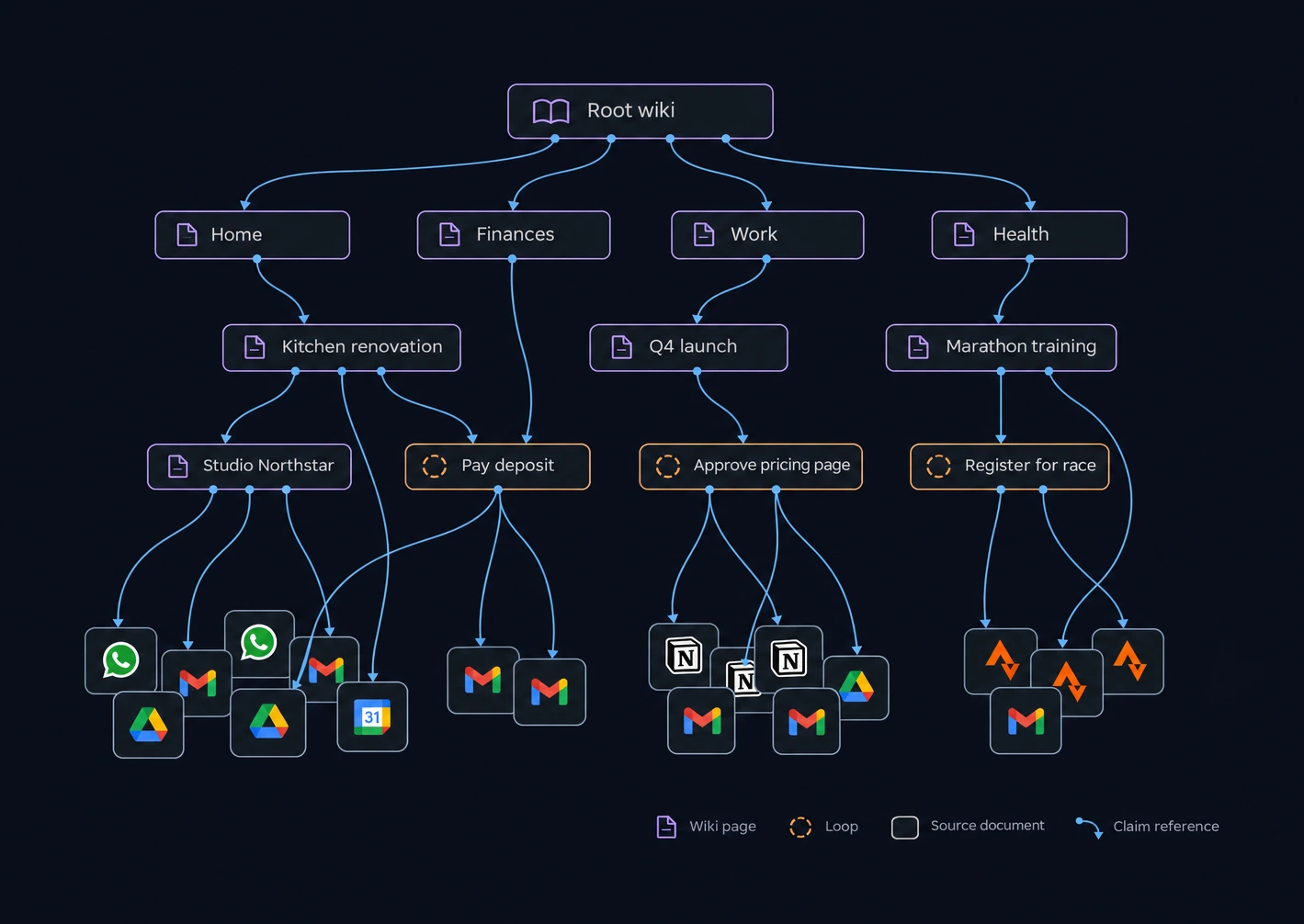
The Brain writes and maintains wiki pages about what is going on in your life: projects, places, people, arrangements. A short root page gives the overview and links to more detailed pages, which can themselves point to even more detailed ones. Underneath, pages refer to the loops the Brain is tracking, and eventually to the raw documents in your sources: emails, chats, files.
Every sentence in a
wiki page is a claim
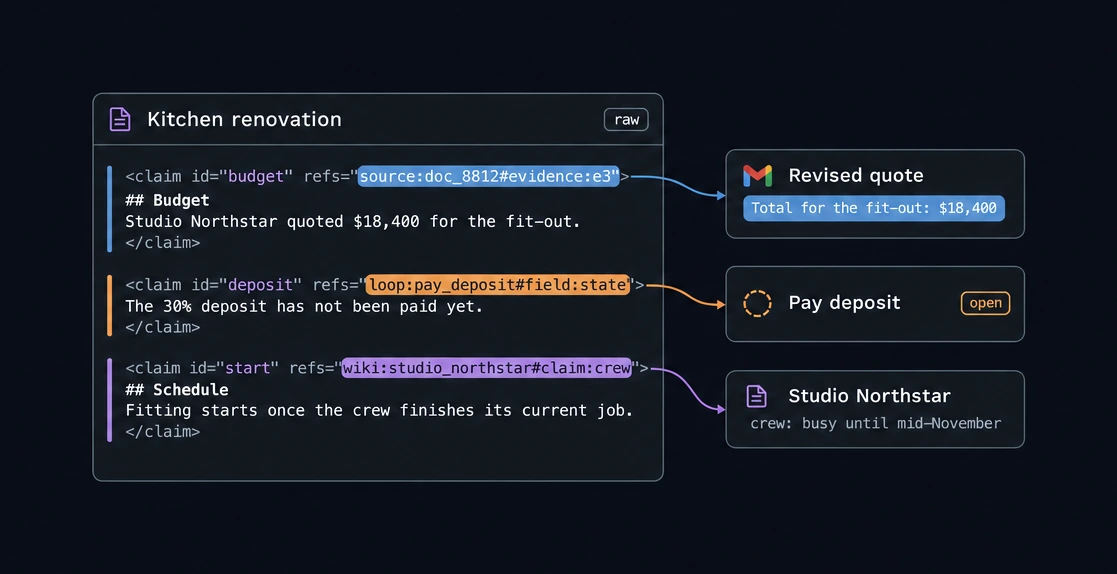
Wiki pages are Markdown, but every bit of text has to sit inside a claim tag. A claim has an ID and references to what supports it: a passage in a source document, a field of a loop, or a claim on another wiki page. A separate verifier model then checks that the references actually entail the claim, taking the page title and section into account, before the claim is marked as verified.
A passage of a document
source:doc#evidence:passage The exact passage in an email, chat, file,
etc.
A field of a loop
loop:id#field:state What a loop currently records, e.g. whether it’s
done.
A claim on another page
wiki:page#claim:id This is how pages build on each other.
When a document changes, the
Brain knows what to re-check
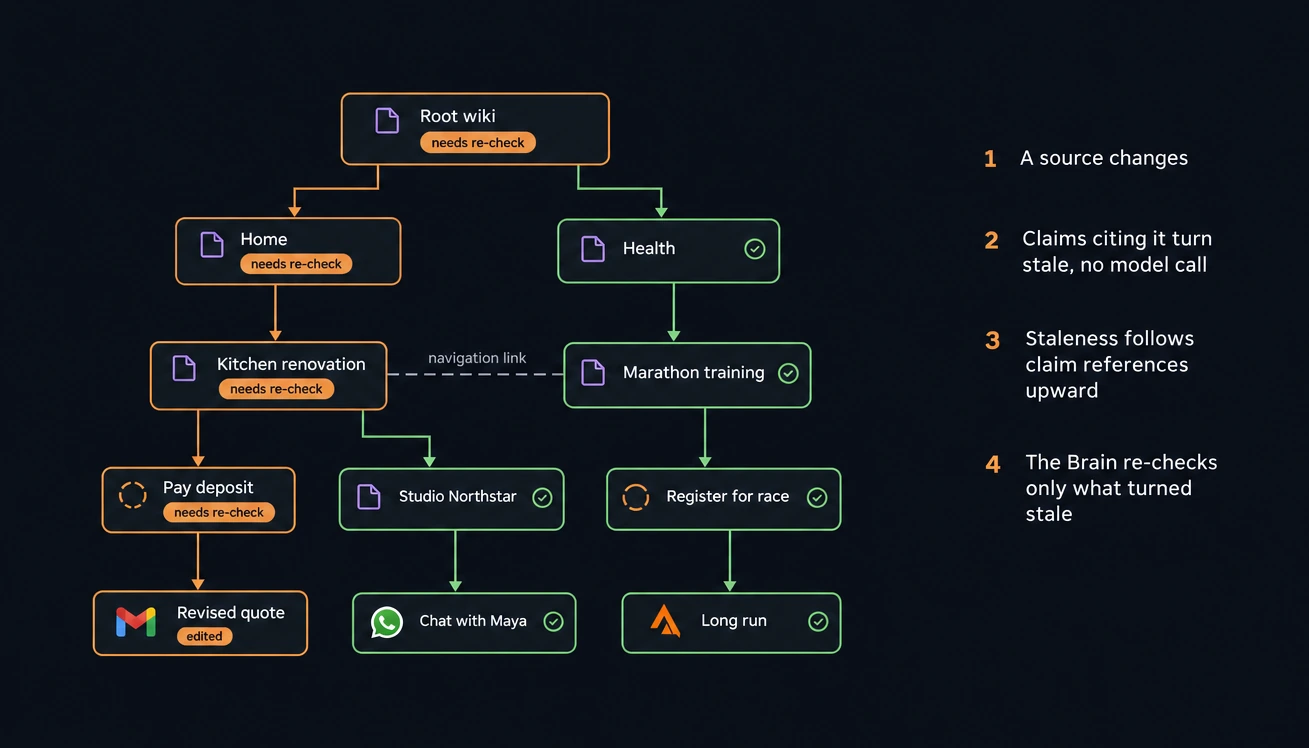
Because claims can point at other claims, everything the Brain derives forms a dependency graph that goes all the way down to your source documents. When a document is edited or deleted, the claims that cite it are marked as stale right away (no model call needed), then the claims that cite those claims, and so on up the graph. Links that are only there for navigation don’t propagate anything. The Brain then only re-checks what was marked stale.
How the agent
uses the wiki
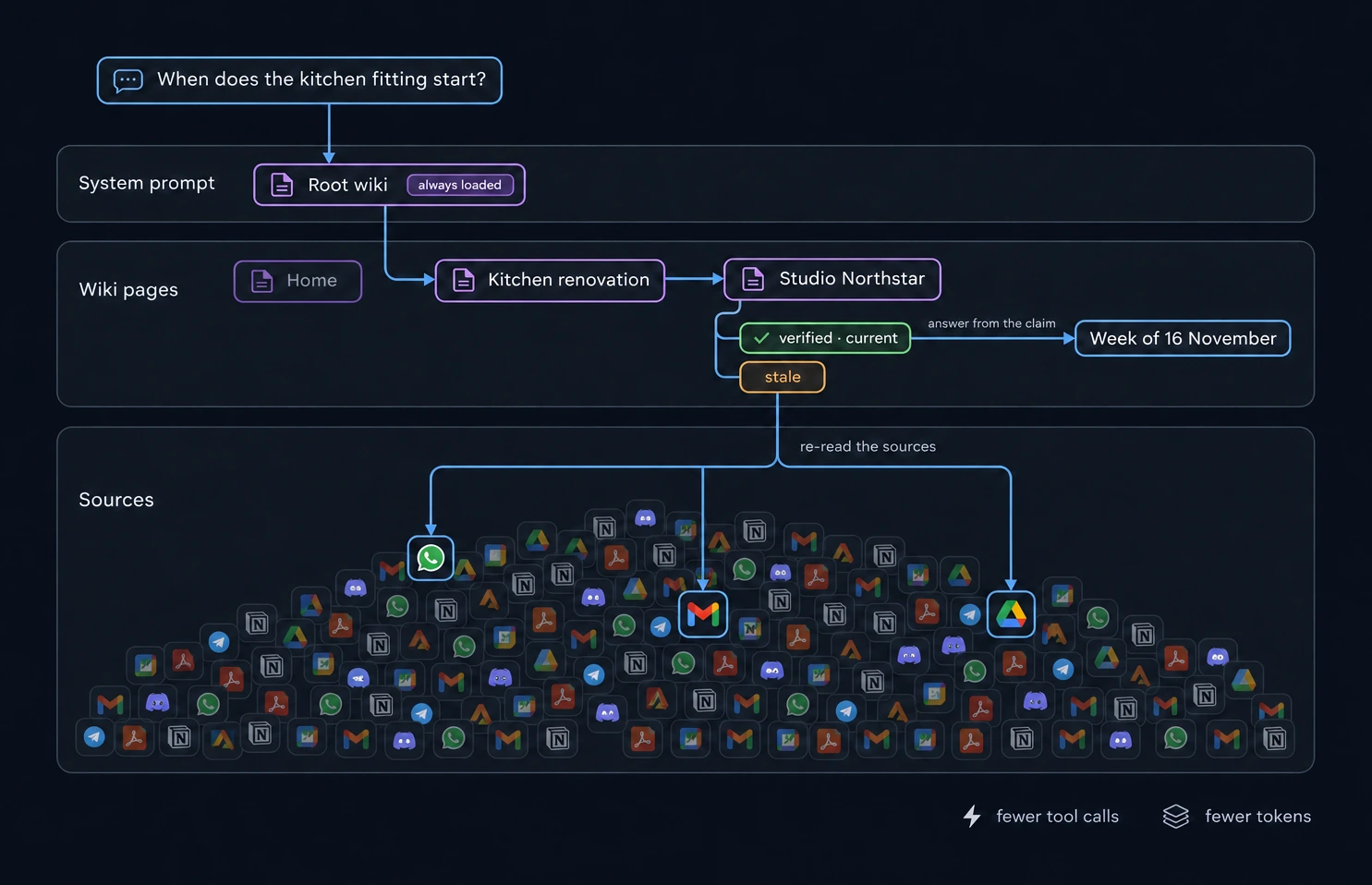
The root wiki is injected in the Omnesis agent’s system prompt, so the agent knows the broad strokes of what is going on in your life from the start of every conversation. From there it can open the pages it needs. If a claim it reads is verified and none of its evidence has changed, the agent can use it as is. If the claim is stale, it goes back and reads the sources.
In practice this means fewer tool calls and fewer tokens, so answers come back faster. This is still very experimental.Experimental
Using a small model to
decide what is worth doing
The Brain is the only part of Omnesis that spends tokens without anyone asking a question, so it has to be careful about what it spends them on. Before the expensive steps, it asks Jev, a small decision model from TypeSafe, for a score. Jev is fast and cheap, every verdict is recorded so you can inspect it, and if Jev is unavailable the Brain falls back to the safe option.
- New documentarrives or changes
- WorthIs it worth reading at all?
- UrgencyNow, within the hour, or later?
- Brain agentreads, links, writes
- Record checkDoes it add real value?
- SalienceDoes it earn your morning?
- Morning briefone message a day
Jev also decides whether a change can affect a claim that depends on it, when a page is due for a review, whether a renamed task is still the same task, and whether a suggested task is worth showing you. When I replayed ten weeks of history, the worth gate alone skipped about 58% of email runs, which were mostly noise.
Sweeps: recipes for
recurrent reflection
Some things about your life are only visible from a distance — changes in health, finance or relationship patterns. Sweeps let a background agent step back and look for those patterns, at a cadence you define, and note what it finds for your morning brief.
One morning brief
a day
The Brain doesn’t send you notifications as it goes. When it notices something you probably don’t know yet and would want to act on, it records an observation, with quotes from its sources and a date after which it stops mattering. Every morning, one run goes through the open observations and writes a single message in your Morning brief conversation. If there is nothing worth saying, there is no message.
Tasks work without the Brain,
and better with it
Tasks are a simple bullet journal that you and the agent can manage. When the Brain is on, the loops it tracks show up as suggested tasks, and the tasks you accept are kept up to date for you.
Without the Brain
Available to everyone
- A bullet journal for today, a specific day, a month or someday, on the portal, iOS, Android and widgets.
- Ask the agent in any conversation to add, complete, move or strike a task, and undo it.
- Tell Omnesis “I sent the invoice” and it gets ticked off, with an undo.
With the Brain
Experimental
- Loops show up as suggestions you can accept, schedule or ignore.
- Accepted tasks get marked done when a source says so and the verifier agrees. You can always undo.
- If a change touches what you wrote yourself, it shows up as a proposal you confirm or dismiss.
- It learns from what you accept and ignore.
Tell the brain,
while on the go
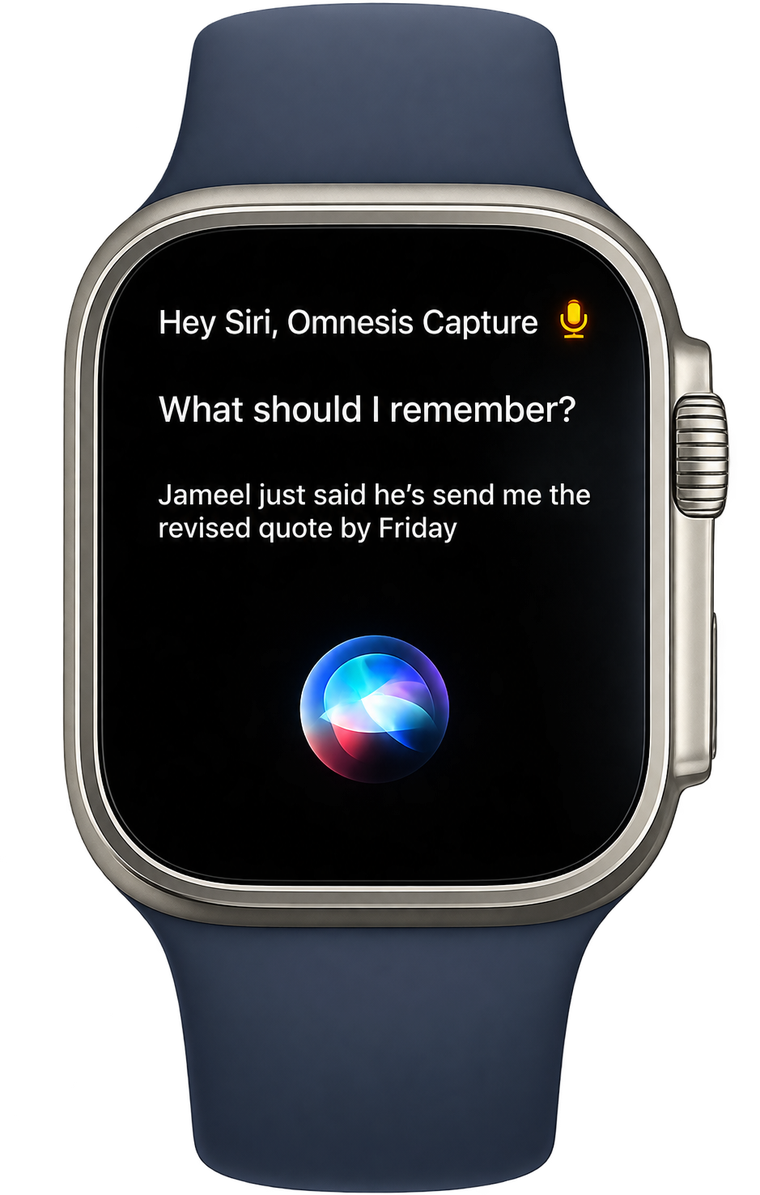
Speak it or type it, in the app, on your watch or with Siri. Each note is read by an agent that acts on it: it can add, complete or move tasks and remember facts about you, and it leaves a receipt you can undo. If it needs to ask you something, it opens a conversation and notifies you. Your note also records when you said it, where you were and what you were doing.
Watch Engine: detect conditions
expressed in natural language
Ask Omnesis to be notified when a certain condition is met. Omnesis compiles your condition expressed in natural language into a DSL evaluated by the Watch engine.
Tell me when I receive an email about a property listing and I have not replied in 3 days.
listing
source=gmail · event=created
LLM judgesemantic recall
my_reply
source=gmail · event=created
unanswered
3 days after arming
collision: reset
from unanswered
Notifies your devices
omnesis-notify
(thread_id)
(thread_id)cancels
Tell me when sleep, HRV and heart rate all deviated from my usual on the same day.
morning_tick
cron 0 9 * * *
sleep_dev
DuckDB over your analytics
hrv_dev
DuckDB over your analytics
hr_dev
DuckDB over your analytics
all_three
every arm, within 1 day
collision: ignore
from all_three
Notifies your devices
omnesis-notify
(day)
(day)
(day)
Tell me when an unusually large payment is made and it can't be explained by a bill I received or a subscription.
spend
table=bank_transactions
op=insertedpredicate=amount<0
above_p99
DuckDB over your analytics
explained
deliberates with tools
LLM investigationhorizon 180 days
from explained
Notifies your devices
omnesis-notify
Watches can wake your external agent
and trigger workflows
Your external agent can ask Omnesis to watch for something. When the condition is met Omnesis wakes the agent so it can pull the necessary context (via Omnesis privacy gate) and run its workflow — no polling.
 Openclawonline
any time I receive a new property listing by email, crawl it, confirm 2 bedrooms and under 30 min from work, then ping me here
Sure thing, let me ask Omnesis to create a watch!
 Inbox
2-bed flat, Maple Court
hi Maya, sending over one new property that just got into the market…
- read email
- crawl listing
- check commute
- draft message
Openclawonline
Sonia sent you a property listing with 2 beds that’s a 15 min walk from work!