One of the things I want from Omnesis is to be able to ask a fairly ordinary question and get an answer that takes the whole story into account. “Remind me how much we agreed to pay the gardener?” is a fairly simple question. It would be bad if Omnesis only used the answer from a quote sent by the gardener via email but failed to consider the WhatsApp conversation with my wife where I tell her that I got a discount on that quote.
I recently wrote about how search works in Omnesis: full-text search finds matching words, vector search finds similar meaning, and the pipeline combines their results. But as seen with this example, even a very good search result can be only the start of answering a question.
So I want to explain another part of the Context Layer: the Omnesis Graph. It gives the agent a way to follow connections between documents so that the agent can follow the trail and find useful context in documents that did not necessarily match the search it did.
A graph of the evidence already in your sources
The Omnesis Graph is not a “knowledge graph” in the sense of extracting/synthesizing entities from raw data. The starting nodes here are the actual documents Omnesis indexed: emails, files, conversations, pages, calendar events. The connections come from things the sources tell us, identifiers in their content, and explicit comparisons between documents.
An email contains an attachment. A message contains the canonical URL of a Google Drive file. Two emails belong to the same thread. An invitation and a calendar event carry the same event identifier. We can record those relationships without having to run any stochastic method with ML models / LLMs.
There are qualifications to this. Omnesis also computes near-duplicate links from text overlap; those are scored similarities, not proof that two files are identical. People identity resolution has its own heuristics, which I covered in the people graph post. And Omnesis records citations made by its own agent as a separate kind of edge. Those citations describe what an answer used, rather than establishing new facts about the world.
Example: a gardener’s quote
Let's make the gardener example concrete. The gardener sends an email with a PDF quote for £600 attached.
I put a copy of that PDF on Google Drive, then share its Drive URL in a WhatsApp group with my wife, informing her of a discount:
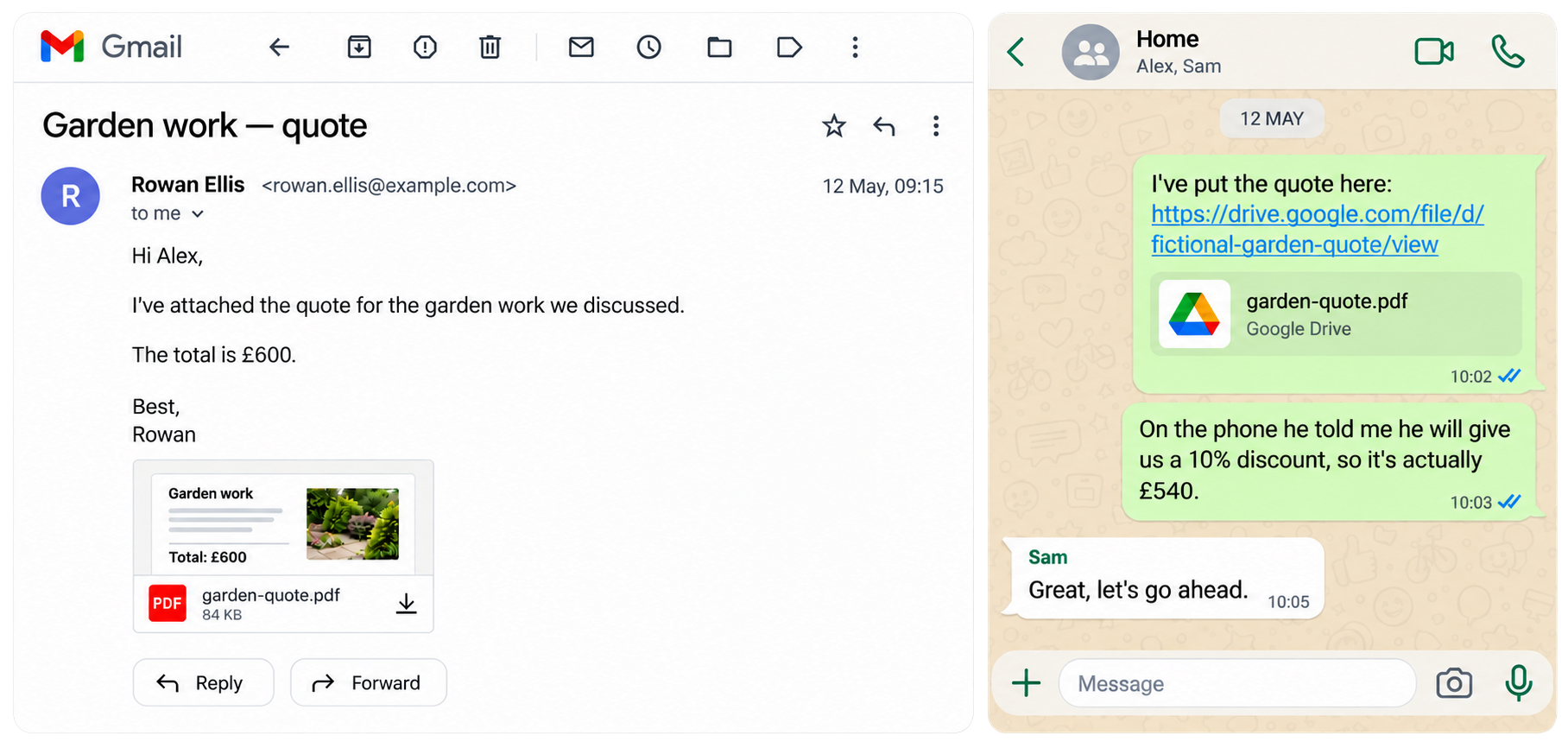
A search for the gardener's quote could find it in either location. Both copies say £600, and the current agent search can group matching files into one result rather than list them twice. The conversation containing the discount might rank poorly, particularly if the message just says “he” and never repeats the gardener's name. The vector embedding for that WhatsApp conversation might not be semantically close to "gardening quote".
But there is another route to it. Omnesis can connect the PDF attachment to the Drive file when their extracted text matches exactly, and connect the WhatsApp conversation to the Drive file through the URL in the conversation. Starting from the PDF, the agent can follow those connections and find + read the conversation.
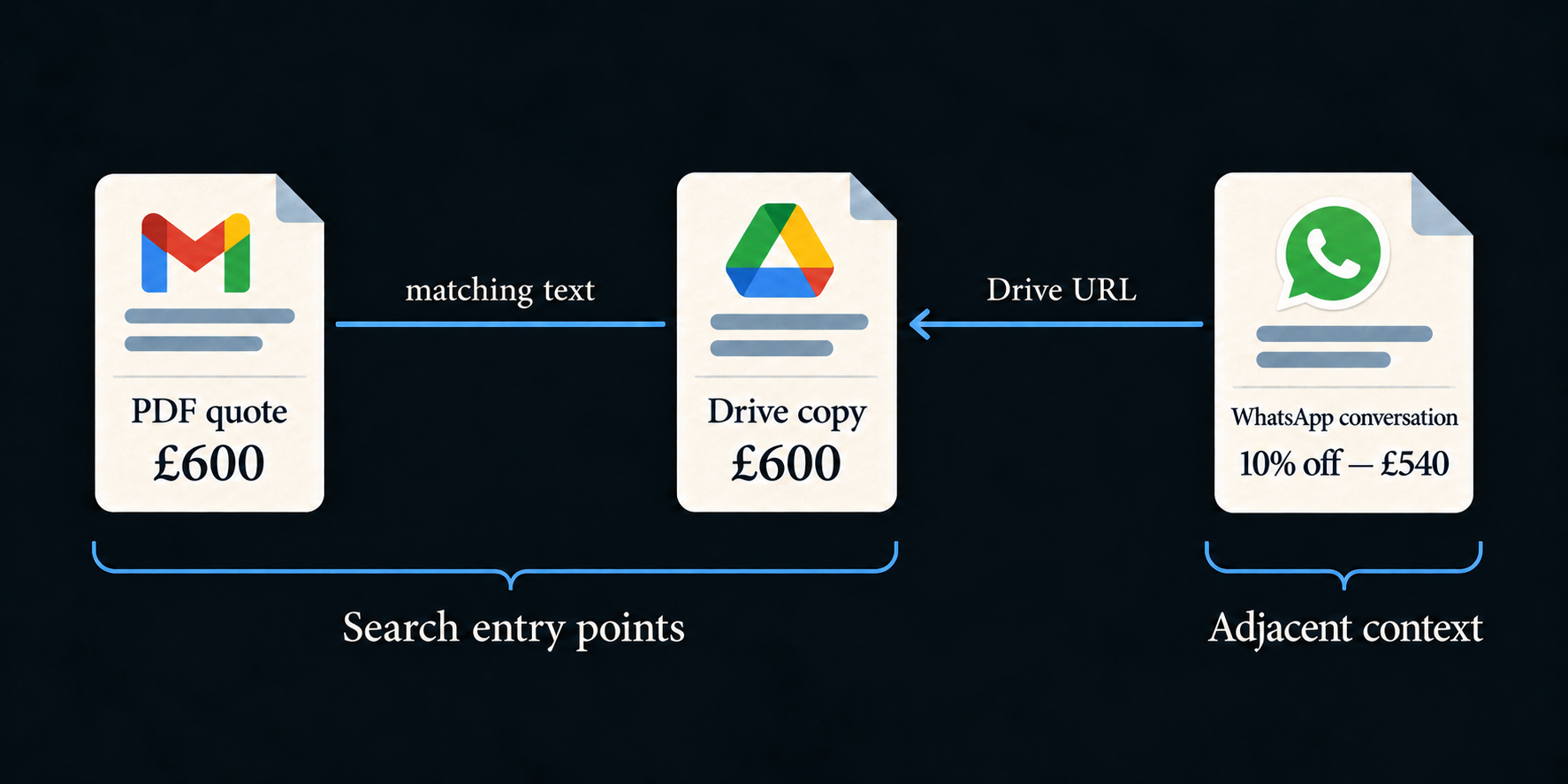
The point isn't that search could never find the discount. It might! The point is that the discount doesn't have to independently match the query to be reachable. Search finds a useful starting document; the graph gives the agent a route to evidence around it.
Reconstructing what happened to a document
Another kind of question is less about extracting a fact and more about reconstructing a trail:
Remind me who I shared V3 of the quote with?
Imagine I sent that version to John as a WhatsApp attachment, emailed it to Maria as an attachment, and sent Oliver a link to the Drive file.
Those actions leave different kinds of evidence. The WhatsApp conversation contains an attachment. The email contains another attachment, with a recipient in its headers. The attachments can connect to the Drive file through matching extracted text. The conversation with Oliver points directly to the Drive file through its URL.
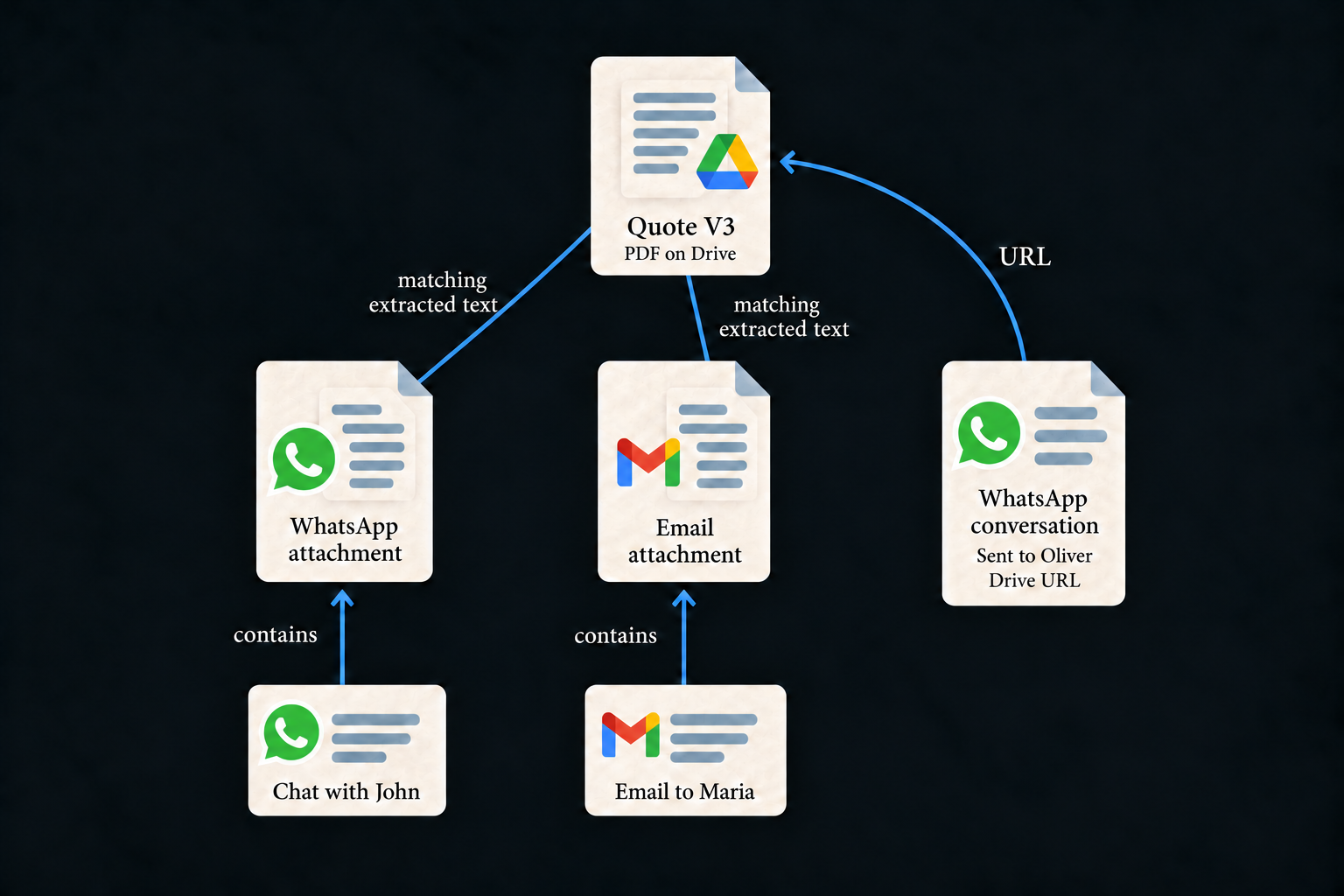
There isn't a magical “shared with” edge that settles the whole question. The answer comes from combining file relationships with the messages, their dates, their recipients and their authors. In particular, a person being a participant in a WhatsApp group doesn't prove that I sent every attachment in it. The agent needs to inspect who sent the relevant message.
Version matters too. A near-duplicate V2 might be almost identical to V3 while differing in exactly the price or clause that matters. Similarity gives the agent somewhere to look; it doesn't justify silently treating two versions as interchangeable. Matching extracted text is stronger evidence, but still doesn't verify byte identity or preserve every visual difference in a PDF.
What kinds of connections are there?
Here is the full edge vocabulary currently supported by the document graph. Not every source emits every relationship: the source has to expose the relevant structure, or the indexed content has to contain the identifier needed to establish it.
First, the relationships a source can declare from its structure:
| Edge | What it records |
|---|---|
contains |
One document contains another: an email and its attachment, a page and its subpage, a project and a task. Attachment is a role on this edge. |
part-of-thread |
Documents belong to the same conversation or thread. This alone doesn't say one replies directly to another. |
replies-to |
A direct reply to another document, for example through email reply headers. |
references |
An explicit source-native reference, such as an Obsidian note linking to another Obsidian note. |
succeeds |
A source-declared ordering, such as one revision or recurring event instance following another. It is not inferred just from similar titles. |
accompanies |
Documents created or sent together as siblings, rather than one containing the other. |
bookmarks |
A bookmark points to the web page it bookmarks. |
visited |
A browsing-history document records a visit to a page. The source's visit records supply the timing. |
Then the connections made by extracting or matching identifiers and content:
| Edge | What it records |
|---|---|
url |
A document contains a URL that resolves to an indexed document's canonical source URL. This is how a chat can point to a Drive file or a captured web page. |
calendar-event |
An invitation attachment and a calendar event share an iCalendar UID. |
duplicate-content |
Eligible files or attachments have the same SHA-256 hash of their extracted text. This can be the case for example if a file on your desktop is the same file on Google Drive and the same attachment you sent by email. |
same-resource |
Retained representations identify the same URL-addressed resource, such as a browser capture and the structured document from its owning source. Their content can differ. |
shares-phone |
Documents mention the same normalized phone number. For example, a call-log document and an indexed business web page can connect through that number. This doesn't establish who answered the call. |
near-duplicate |
Text-overlap detection finds sufficiently similar documents and stores a similarity score. It uses text shingles, MinHash candidate discovery and an overlap check, rather than an LLM or semantic embedding match. |
Finally, there are connections to people, structured data, and the agent's own citations:
| Edge | What it records |
|---|---|
author |
A person is identified as the document's author. |
sender |
A person is identified as its sender. |
recipient |
A person is identified as a recipient. |
participant |
A person participates in the conversation represented by the document. |
attendee |
A person is listed as an attendee. |
mentioned |
A person identifier is mentioned; this is weaker than authorship or participation. |
contact |
A document is a contact record for the person. |
owner |
A source identifies the person as the document's owner. |
same-entity |
A source binds a document and a structured analytics row to the same underlying item, such as an activity and its row of measurements. This connection is assembled when walking the graph. |
cited |
An Omnesis answer conversation cites a document. This is agent-authored provenance, not independent corroboration; the current search graph context excludes these links and Omnesis-generated documents. |
The phone mention can be interesting for example to help Omnesis understand who is behind a phone number that called you even if you don’t have that number in your contacts. Omnesis might find a particular phone number in your call log and know it’s the gardener because that phone number appeared on the gardener’s web page which was captured by the Chrome extension.
How a URL becomes a connection
Sources supply canonical URLs for documents they can identify in their original app. Omnesis extracts URLs from document content, normalizes them, and uses source-specific canonicalization rules to match supported variants. A share link and a browser URL can therefore resolve to the same destination when the source knows how to recognize them.
This is useful across apps. WhatsApp doesn't need to understand the Drive file format. It just needs to preserve the link in the message. Drive supplies the document and its canonical address, and Omnesis joins the two.
The target also needs to exist in the index. An unresolved URL can be retained and resolved when its target arrives later. Following the graph isn't a promise to open every link on the internet, and a URL that never resolves to an indexed target doesn't give us that target's contents.
These edges also have a direction. The conversation points to the Drive file, rather than the file pointing to the conversation. Retrieval can follow the relationship in either direction, which is precisely what we need when we start at a file and ask where it was discussed.
Giving the agent breadcrumbs before it asks
The Omnesis agent is provided with a tool that the LLM can use to traverse the graph from seed documents. However, having such a tool isn’t enough. If the agent answers the question "How much did we agree to pay?", the agent might find a PDF result saying “£600”, which looks like a complete answer. I could fix this by instructing the agent in the system prompt to always do due diligence and use the graph tool to find edges from that PDF in the graph. However, for many queries, this would be added latency and wasted effort.
The solution I came up with is to give the Omnesis agent additional adjacent context before it asks for it. As such, search results contain inline graph context that I call breadcrumbs. Alongside a hit, the agent can see how it connects to other documents and which of those might be worth opening.
In the gardener example, that means the result can point to the matching Drive copy and the WhatsApp conversation linking to it. The agent now knows where to look. It still hasn't read the discount message: the connection is a pointer to evidence, not a summary of what the conversation says.
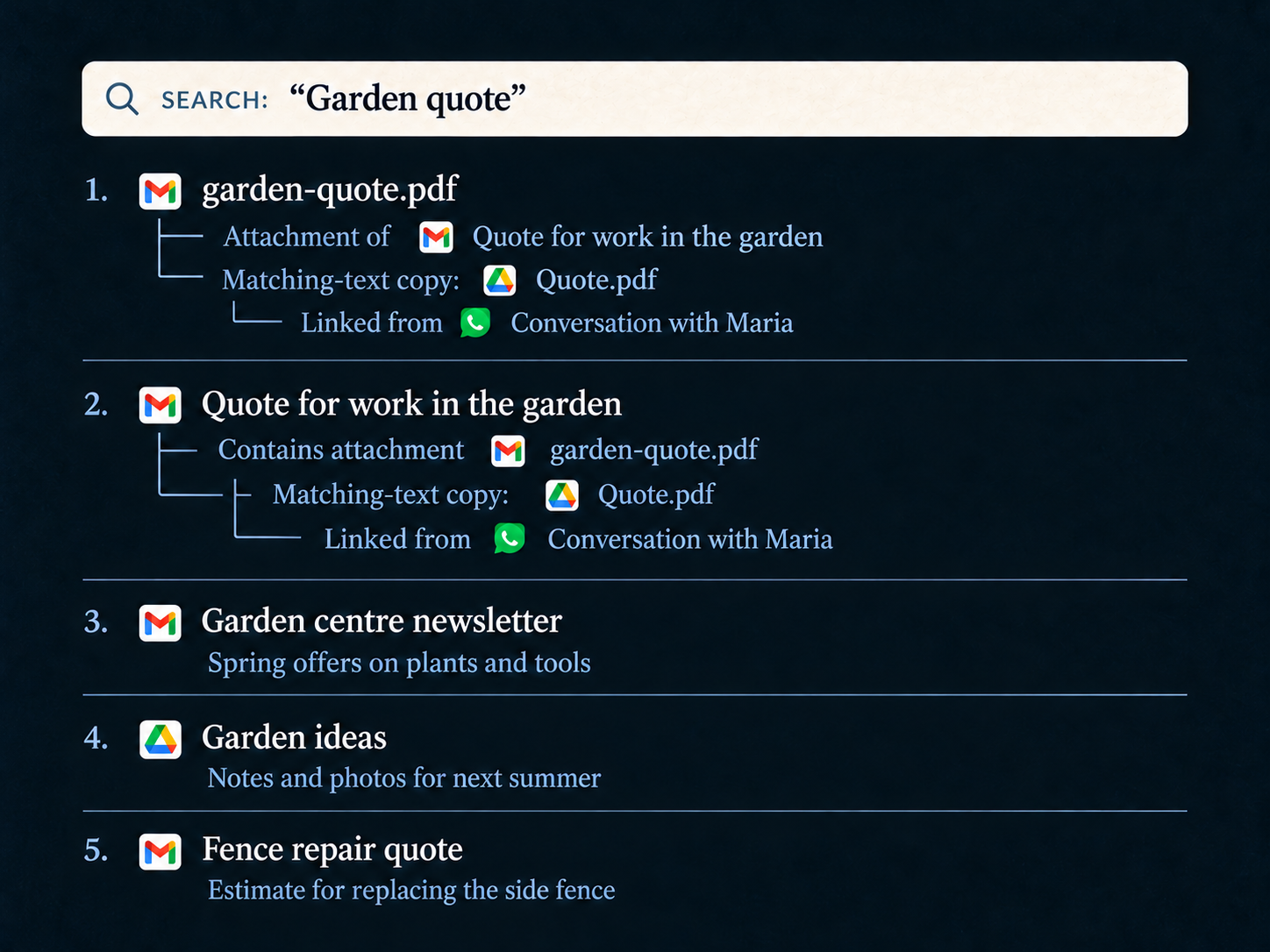
The current representation includes short relationship facts, a reference table mapping
labels such as [D1] to document IDs, titles, sources and dates, and limits
describing where exploration stopped. A conversation fact can identify the newest
message in the thread. A connected document can also be marked as another result in the
same search, avoiding the impression that it is a separate piece of evidence.
When inline graph context is disabled, a smaller breadcrumb list supplies a
few one-hop neighbours on the top search hits. Either way, the agent doesn't need a
separate graph call just to discover that an attachment belongs to an email or that a
later reply exists.
Results can also carry a refCount: how many distinct documents point to the
hit through the relevant links. It is a connectedness hint, not an importance or
relevance score. A thin snippet with several incoming references can be a good reason to
investigate, but a highly connected document isn't automatically the answer.
The default inline context follows containment, replies, thread membership, calendar-event links, references and URLs. It leaves text similarity, shared phone numbers and browsing relationships for deliberate expansion. Otherwise, a useful clue could quickly turn into a very large neighbourhood of loosely related material.
Following the trail from a seed
The agent has three useful steps available:
-
search_manyfinds starting documents and returns their inline context. -
fetch_manyreads selected documents. AddingincludeNeighbors: trueto an item also returns a capped sample of its direct neighbours. -
trace_connectionswalks further from one or more document IDs, the seeds, and returns a chronological trail with attachments nested under their parent events, relationship types, dates and people by role.
For the V3 question, the agent can seed the walk with the Drive file and explicitly
include duplicate-content to reach copies sent as attachments. If it also
needs to investigate similar revisions, it can request
near-duplicate separately. Those choices should be driven by the question,
rather than expanding every kind of connection on every search.
trace_connections accepts up to five seeds, a depth and a per-category
fanout cap. Its usual defaults are four hops and a fanout of 25; with the current graph
context, a walk whose seeds are all attachments or contained parts defaults to two hops.
The result also reports when it was truncated.
Join the discussion
Comments and reactions are public and stored on GitHub. Sign in with GitHub to participate.
The comments widget connects to Giscus and GitHub when you load it. Privacy details.
You can also visit Blog comments on GitHub.